
Case study

In 2020, I worked on a coronavirus help directory – Covid Brighton & Hove – for Brighton & Hove (the city I live in) on behalf of two amazing clients — Community Works and The Trust For Developing Communities, with funding from NHS Brighton and Hove Clinical Commissioning Group and Sussex Community Foundation.
Note: The website itself has been retired.
The brief: connect people to support
Covid made life tough for everyone. But it was not ‘the great leveller’. For some people — those who need to stay at home to protect themselves, or those living in poverty, for example — the situation was critical.
Local government, charities, and volunteer organisations in Brighton were fast to react and came up with amazing solutions to help. For example Together Co, a loneliness charity that quickly redeployed its volunteers to deliver food and essentials to people stuck at home. Or Brighton & Hove Food Partnership which mobilised to help people find free or cheap, healthy food.
The brief was to build a site — fast — that would help the most vulnerable people in the city find all these brilliant sources of support.
Discovery: three key questions
We started off with a quick discovery phase. As tempting as it was to just start building when things feel urgent, it was essential to do some research first.
The three questions we focused on were:
- What’s already out there?: We wanted to make sure we weren’t duplicating work and effort, or confusing people by creating multiple sites that fulfil the same purpose.
- What do people need?: We needed to find out who needed help most and what they needed help with. I spoke to the Trust for Developing Communities’ amazing community workers as this was the fastest, most effective way to get a broad view of the situation. I also researched what people were asking for help within local mutual aid groups and looked at demographic data for the city (for example, what languages people speak and which communities are most vulnerable).
- What does the network look like?: We mapped the network of services and organisations offering help. Community Works and Trust for Developing Communities provided me with lots of information and useful connections.
Key user needs
We found that the key audiences for the site were:
- people who have to stay at home (also known as shielding or self-isolating) because of their age or an illness
- people living in poverty
- people who are socially isolated
- disabled people
and that the key difficulties they were facing were:
- struggling with getting food or medicine
- feeling lonely
- worrying about their health
- worrying about money and paying rent and bills.
We also found that:
- some people might not have access to broadband or a smartphone
- professionals, volunteers and members of the public might use the site to support someone else.
There were some insights specific to Brighton that we needed to factor in too:
- a high rate of homelessness
- a large LGBTQIA population
- no major ethnic minority groups, but lots of smaller ones (this is important for understanding translation needs)
Our proposition and principles
The proposition we came up with, based on the discovery, was:
There are a wealth of organisations providing support, but no single place to find out about them. This site will act as a single destination where vulnerable people and their friends, family and carers can go to find help.
Our principles were:
- Signpost, don’t duplicate: If it already exists, don’t recreate it — link to it
- Collaborate and share: Ask for help and guidance from people in-the-know, the Council, charities, and volunteer organisations on the frontline
- Prioritise, prioritise, prioritise: Focus on creating signposts for critical needs and for people finding things hardest
- Make it accessible, easy to read and easy to use: It’s better for everyone
- Make it mobile-first and fast: Not everyone has a desktop/laptop or a broadband connection
- Move fast and keep it simple: Think of the simplest, fastest solution and do that. Things are changing daily, so don’t over-engineer solutions.
Our content model and taxonomy
The basic unit of the content model for the site was the ‘signpost’. A signpost is a listing for a source of support.
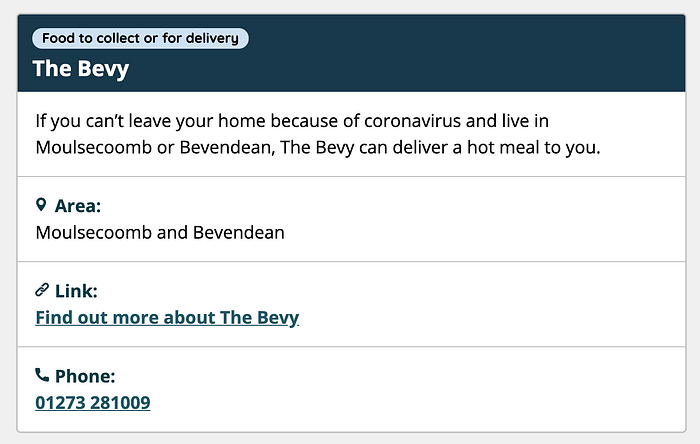
A single organisation could have multiple signposts. For example, for Citizens Advice we had different signposts for information about rent and being furloughed.
The structure for the signposts was:
- Organisation name
- Support description
- Link
- Phone number
- Opening hours
- Area of the city
Signposts were create-once-publish-everywhere — we created the entity and then embedded it on multiple pages. The benefit of doing it this way was that if the details change, you only need to update one place.
Signposts were also printable. Because many people who needed help weren’t online, we wanted to make it easy for friends, family, and carers to print details and post them through the letterbox.
The taxonomy was based on user needs, characteristics, and locations. The idea behind this approach was to make it easy to create highly relevant collections of signposts for different user needs or types of users. The taxonomy for areas of the city is based on a combination of electoral wards and local ‘folksonomy’.
See the taxonomy here: Covid Brighton & Hove taxonomy
Navigation and information architecture
The site has four categories of support, which form the navigation and information architecture. They were:
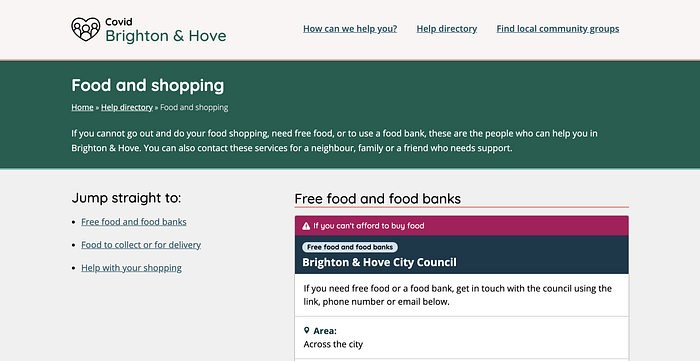
1. The help directory. This was the main directory of support. We based the structure on what research showed were the biggest areas of need and the communities finding things hardest. The sub-pages were:
- Food and shopping
- Health and mental health
- Rent and housing
- Work, money and benefits
- Domestic and sexual violence
- Drugs and alcohol
- Support for disabled people
- Support for older people
- Support for young people
- Support for LGBTQIA people
- Support for ethnic minority people and refugees
- Support for sex workers
2. How can we help? This category linked to very specific, urgent needs. We created this based on an important insight that some users don’t feel comfortable with navigating websites. We wanted to make sure we could directly link to pages that would meet those people’s needs on the homepage. The sub-pages in this section were:
- I need someone to do my food shopping
- I need free food or a food bank
- I need someone to get my medicine
- I need someone to talk to
- I can’t pay my rent
- I need help with technology
3. Find local community groups. This category linked to support at a hyper-local level. It includes community groups that have existed for years, mutual aid groups created since the crisis, and services (like meal delivery) that only run in specific areas of the city.
4. Translations. Translated content in the languages most commonly spoken across the city. User research showed that people who speak other languages might struggle to find help, as so much of the first wave of advice was only available in English. The translated pages only signposted services where people would be able to speak to a translator. I got the translations through a combination of copying information from elsewhere and asking for favours from native speakers. The pages also include translated fact sheets and videos from GOV.UK and the Red Cross with general health advice.
Content creation
I collect the signposts in a spreadsheet and used data validation based on the taxonomy above to assign each signpost a support category, support sub-category, and a specific audience group, and area of the city (if applicable).
This made it easier to create collections of signposts for different needs which form the pages of the site.
Technology
I can’t speak much to the technical side of the project, as full credit for that goes to Brightminded. What I can tell you is:
- we built the site in WordPress
- we used the Generate Press theme, because it’s lightweight, responsive and accessible
- we used the Elementor plugin as a page builder
Design
Tom Prior did an amazing job with the design for the site. What I can tell you about this is:
- the fonts were Quicksand and Open Sans, which are both highly legible. The British Dyslexia Association also recommends Open Sans
- Tom was careful about making sure that we have good type contrast throughout the site
- the icons were from Flaticon
Writing and style points
Some writing and style points we adopted were:
- Write to the reader directly — ‘you can do this’, ‘you can call them’ etc.
- Make sure to include a reference to using the site on behalf of other people wherever possible. Many users are likely to be doing so for a neighbour, family, friend, client and they need to know this is for them too.
- Try not to say things like ‘self-isolating’ or ‘shielding’, explain what it actually means. For example, ‘if you have been told you need to stay at home’.
- Try not to say ‘social distancing’, explain what it means. For example, ‘Stay six feet or two meters away from other people’.
- Make link text specific and descriptive — never ‘Click here’ or ‘Find out more’.
- All signpost links (links to other websites) must open in a new tab.
Spread the word
‘Build it and they’ll come’ never works, and this was no exception. To spread the word, we asked the organisations signposted on the site and local community groups and workers to link to and share the site. Local community Facebook groups were a big source of traffic. Organic search also generated a lot of traffic, as our pages reflected local needs and search terms.
The outcome
The site helped over 19,000 people find sources of support, including food banks, emergency financial support, mental health support, and more. This was measured as events – where people clicked through to a source of support, so the real number may be even higher.
It also influenced the design of the Trust for Developing Communities’ new website later on, which used the same signposting model.
First published: 14th May 2020
Last updated: 23rd April 2026